
Why are there two different rate settings?
When setting up a spray job, VineTrack asks two separate questions:
- How much water or spray solution will your sprayer apply? This is the Spray Volume, sometimes referred to as the water/carrier rate.
- How much chemical should be applied? This is the Chemical Application Rate selected for each product, taking account of its approved grapevine label information and any relevant operator-confirmed rate.
These are separate settings. First choose the water volume and any applicable concentration factor; then select the products and application rates. VineTrack combines them to calculate total water, total chemical quantities and planned quantities for each tank.
Spray Volume
How much spray solution?
500 L/haExample calibrated water outputChemical Application Rate
How much product?
2 L/ha or 100 mL/100 LExample rates; different product basesStep 1 — Choose Spray Volume basis
How does your equipment measure the amount of liquid it puts out? In Carrier / Spray Volume choose an available water-entry basis:
- Litres per 100 metres of vine row (L/100 m): spray solution applied for each 100 metres along a vine row.
- Litres per hectare (L/ha): spray solution applied across each hectare. This is a commonly used basis.
- Manual total water: enter the known total litres directly, for example for a knapsack, hand-spraying or a small-volume job.
Available options depend on the applicable vineyard and regional settings; L/100 m is not available to everyone.
The canopy steps below apply only to relevant non-Manual foliar spraying. Direct ground/banded applications use the relevant treated/whole-block area and calibrated ground-spray volume instead; they do not use the foliar canopy concentration path.
Step 2 — Choose canopy type
For relevant non-Manual foliar spraying, choose the canopy type that matches your vines: Vertical Shoot Positioning (VSP) or Sprawl.
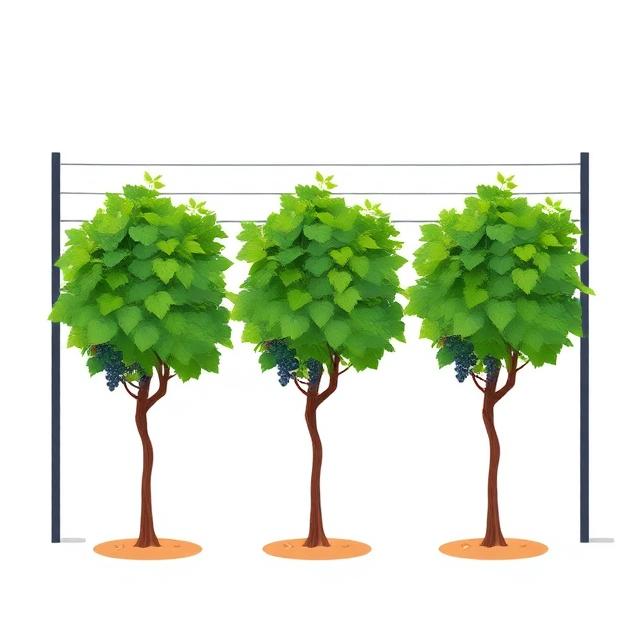

These are original VineTrack canopy reference illustrations, separate from the actual iPhone screenshot slots. Manual total water bypasses this selection.
Step 3 — Select canopy size and density
Select Small, Medium, Large or Full using the reference pictures for your chosen canopy type.
Vertical Shoot Positioning (VSP)



Sprawl

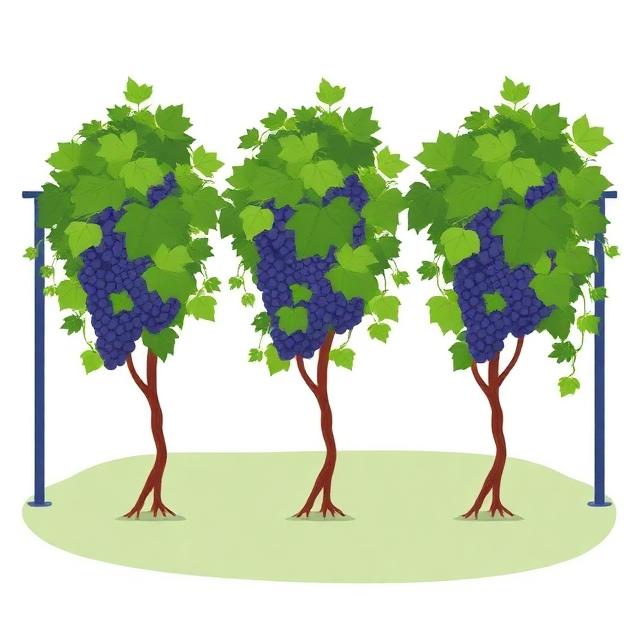

Step 4 — VineTrack recommends the dilute Spray Volume (CF 1.00)
Your canopy selection and the vineyard’s canopy water-rate table provide a recommended dilute/runoff reference in litres per 100 metres of vine row. This recommended dilute volume is CF 1.00.
“100 m of vine row” means 100 metres measured along a row, not 100 square metres of vineyard. The original VineTrack One Unit Canopy Row (UCR) diagram below represents a reference canopy 1 m wide × 1 m high × 100 m long, with its length compressed for illustration.
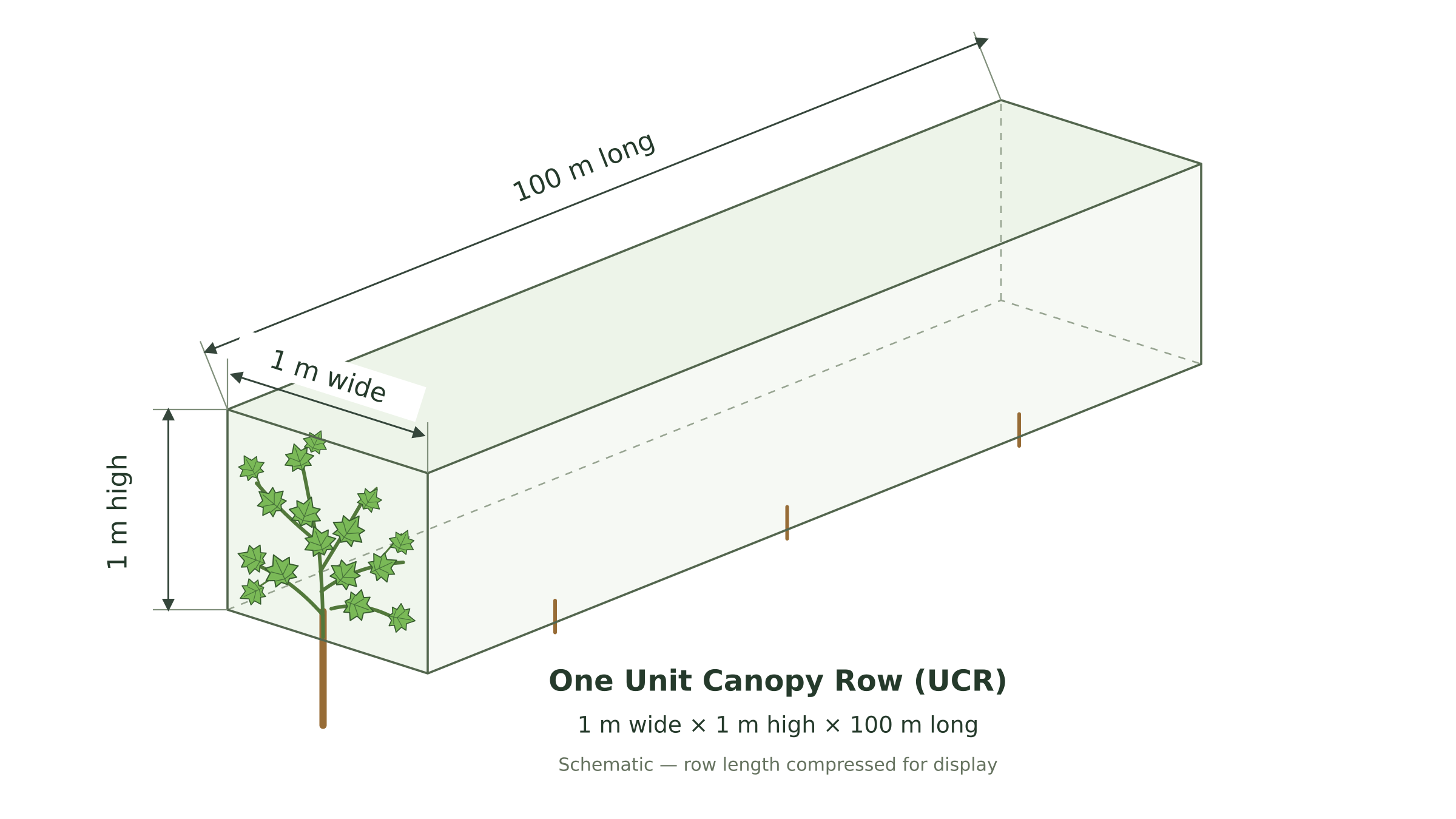
UCR is a standard canopy volume/row reference diagram. It does not itself recommend an L/100 m water dose and is not a photograph of all the vines in your block. Your canopy selection and vineyard water-rate settings determine the dilute recommendation.
VineTrack uses the vineyard configuration, including valid matching row spacing, to calculate the equivalent L/ha for that vineyard. Row spacing determines how many metres of vine row fit into a hectare.
L/100 m → L/ha
Step 5 — Use recommended volume or set your own rate
Choose “Use recommended rate” to accept the CF 1.00 dilute reference, or “Set my own rate” to enter the ACTUAL calibrated output of your machine. The actual rate may be above or below the recommendation.
For example, a recommended dilute volume of 800 L/ha and a calibrated sprayer output of 500 L/ha are different WATER settings, not different chemical label rates. Water and tank quantities are recalculated for the selected actual output.
Practical adjustments may help suit tank capacity or tank count, but the selected rate must still reflect calibrated machine output and meet coverage and label requirements.
Step 6 — Concentration factor
For a relevant foliar job, VineTrack compares the selected ACTUAL spray volume with the recommended dilute reference. Where valid comparable references exist: CF = max(1.00, recommended dilute ÷ actual volume). The factor does not go below 1.00.
- Actual volume BELOW dilute: CF is greater than 1.00. For example, 1,000 L/ha dilute ÷ 500 L/ha actual = CF 2.00x.
- Actual volume ABOVE dilute: CF stays 1.00; it does not become less than 1.00. For example, max(1.00, 1,000 ÷ 1,250) = CF 1.00.
Chemical quantities are recalculated as actual water and applicable CF change. The two product rate bases remain independent:
- Area-basis (/ha) chemicals: selected label/operational rate × appropriate area (whole block or treated band when supported). CF does not multiply the per-hectare dose.
- Per-100-L products: selected rate × actual carrier litres / 100 × applicable CF.
Using less spray water does NOT automatically justify using less chemical. The CF arithmetic assists with calculating a concentrate application only where allowed by the product label.
Manual total water bypasses canopy recommendation and canopy CF, using CF 1.00 with no runoff modelling. Direct ground/banded spraying does not use the foliar canopy concentration path.
Step 7 — Choose chemical and application rate
After choosing the spray volume and applicable CF, go to Products. Choose each saved chemical, inspect its approved grapevine-use label/rate information or relevant operator-confirmed operational rate, and select the intended application rate. Current approved label and legal requirements still govern the application.
If a confirmed label rate is a range, select an actual applied rate inside that range; do not silently choose a midpoint or endpoint. Product lines with missing or invalid required rates remain unresolved rather than being treated as zero.
Product stock units (mL/L/g/kg) must be displayed correctly and independently from the label rate units.
Step 8 — Review
Review total area, total water, selected product doses, applicable CF, tank capacity and the full/partial tank splits before creating the planned job.
For this fictional CF 1.00 example: a 5 ha job, a sprayer calibrated to 500 L/ha and a 1,000 L tank capacity gives 5 × 500 = 2,500 L total water. Tank 1 = 1,000 L; Tank 2 = 1,000 L; Tank 3 = 500 L.
Fictional Product A at 2 L/ha totals 10 L: 4 L per full tank and 2 L in the final 500 L tank. Fictional Product B at 100 mL/100 L with CF 1.00 totals 2.5 L: 1 L per full tank and 500 mL in the final tank.
One job. Three planned tanks.
5 ha × 500 L/ha = 2,500 L water · 1,000 L tank capacity
| Planned amount | Tank 1 | Tank 2 | Tank 3 · partial | Job total |
|---|---|---|---|---|
| Water | 1,000 L | 1,000 L | 500 L | 2,500 L |
| Fictional Product A2 L/ha | 4 L | 4 L | 2 L | 10 L |
| Fictional Product B100 mL/100 L | 1 L | 1 L | 500 mL | 2.5 L |
Step 9 — Create Spray Job & View Tank Mix
Tap the existing button “Create Spray Job & View Tank Mix”. This creates the planned Spray Job and opens “Spray Tank Mixing” before “Start Spray Trip”.
The confirmation screen shows total area, total water, the number of full tanks, final tank volume and planned water and chemical quantities PER tank. The smaller final tank contains proportionate water and product amounts.
Review and verify all planned tank quantities and applicable label instructions before “Start Spray Trip”.
Frequently asked questions
If I change the water rate, does that change the chemical’s per-hectare rate?
No. Per-hectare chemicals are calculated against the appropriate area. Changing the sprayer’s water volume affects the carrier and tank fills, not the selected per-hectare rate. Per-100-L quantities recalculate using actual carrier and applicable CF.
Is L/100 m the same as a chemical rate per 100 L?
No. L/100 m is WATER delivered along 100 metres of vine row; a chemical /100 L rate is PRODUCT amount per 100 L of carrier solution, with any applicable CF adjustment.
Does canopy size alone determine the recommendation?
No. For relevant non-Manual foliar spraying, canopy type, size and selected/confirmed density inform the recommendation with the vineyard’s canopy water-rate table. Manual total water bypasses those controls.
Why is the derived L/ha value unavailable?
The conversion needs valid matching row-spacing information from the vineyard configuration. Do not assume row spacing or treat an unavailable value as zero.
Can concentration factor be less than 1.00?
No. When actual water exceeds the dilute reference, CF stays 1.00. A calculated CF never grants permission for concentrate spraying; current approved label requirements control.
Why does the last tank have less chemical?
Because the final tank may contain less water and cover a smaller part of the job. VineTrack proportions the planned chemical amount.
Why does a chemical say unavailable?
It may need a valid selected label/operational rate, carrier volume or calculation-area information. Resolve the missing input rather than accepting a zero dose.
Can I use an off-label rate?
The operator is responsible for label/legal compliance. This guide explains calculations, not permission for off-label use.